
AI FACE SWAP REVIEW
Visro AI vs Vidnoz: Which AI Face Swap Tool Is Right for You?
Summary: Discover a clear comparison between Visro AI and Vidnoz for online face swap—free vs pro, speed vs control, perfect tool for your AI content creation needs.
Swap Faces, Instantly and Freely.
A Real Story: Which Tool Should I Choose?
Hey everyone! Last week, my friend Lisa came to me with a question that I bet a lot of you have asked yourselves:
“I want to fix the photo from our family gathering where Mom closed her eyes, but I don’t want to spend too much. Which AI face swap tool should I use?”
Sound familiar? That question pretty much reflects what most users want: simple, fast, preferably free—yet the result still has to be decent.
Today, let’s dive deep into two major AI face swap tools—Visro AI and Vidnoz—to figure out which one fits your needs best. Trust me, by the end of this article, you’ll know exactly which tool to pick!
First Impressions: What Happens in the First 5 Minutes?
Visro AI: Minimalist and Lightning Fast
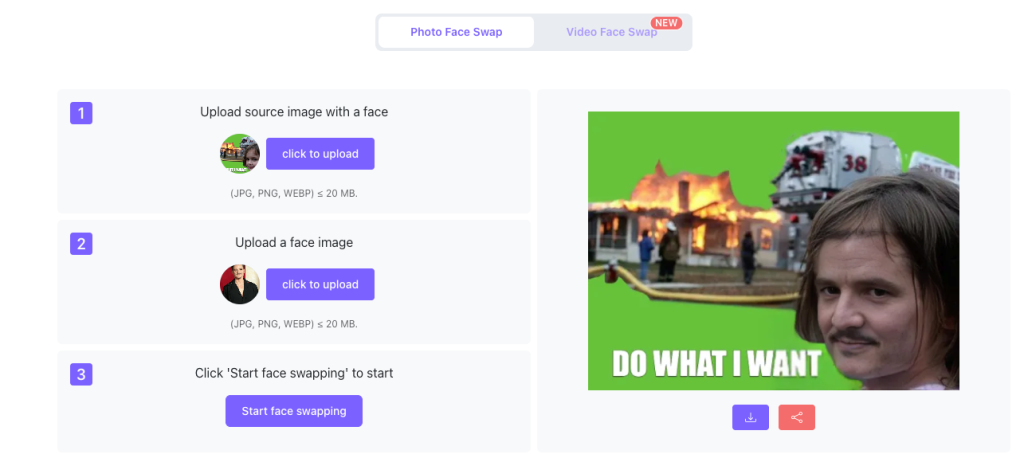
The moment you land on Visro’s website, it’s super clean. No clutter. No distractions. Just one big “Upload Photo” button staring at you, ready to go.
What I love about Visro:
- ✅ No complicated menus
- ✅ No registration needed
- ✅ No credit system to figure out
How I tried it:
- Uploaded a selfie
- Uploaded the face I wanted to swap
- Clicked “Start Face Swap”
- Waited… less than 5 seconds
- Downloaded the result—no watermark!
Seriously, it’s so easy that even my mom could do it. And she still thinks “the cloud” is something in the sky.
Vidnoz: Feature-Packed, Good AI Face Filters & Effects Online Free
Opening Vidnoz feels like entering a tech supermarket. There’s a LOT to explore:
- Face Swap
- AI Video Generator
- AI Avatar
- AI Voice
- …and tons of other modules
My first try:
- Select Face Swap from the menu
- Upload my photo
- Tweak adjustment settings (lighting, blending, clarity…)
- Generate the result—the quality is noticeably higher
It works well, but honestly? It feels a bit overwhelming at first. Lots of power, lots of steps.
What Are You Actually Using AI Face Swap For?
Before diving deeper, let’s ask yourself three key questions. Here’s a quick comparison that’ll help you decide:
1.What Am I Swapping?
| Feature | Visro AI | Vidnoz |
|---|---|---|
| Photo face swap | ✅ Quick & easy | ✅ Supports |
| Video face swap | ✅ Supports | ✅ Fine-tuning available |
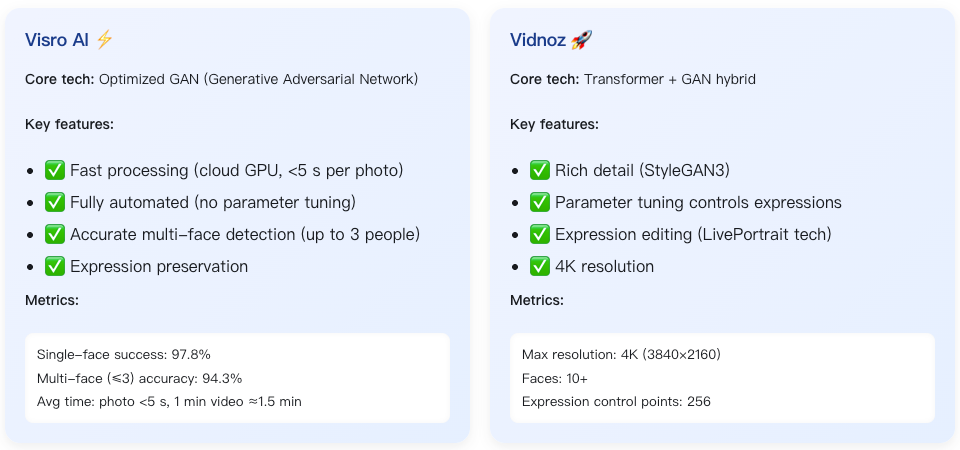
| Multiple people swap | ✅ Up to 3 | ✅ 10+ people |
| Batch processing | ✅ Free & unlimited | Paid |
💡 Tip: If you want fast swaps for family photos or memes, Visro AI is your best bet. For larger projects or more control, Vidnoz wins.
2.What Quality Do I Need?
| Quality Level | Visro AI | Vidnoz |
|---|---|---|
| “Good enough” (social posts, memes) | Covered | ✅ Covered |
| Professional output (commercial prints, high-res) | Limited | ✅ 4K support |
| Manual expression adjustments | Not available | ✅ Yes, full control |
💡 Tip: For casual fun, Visro works perfectly. For professional-grade results or creative control, Vidnoz is the way to go.
3.What’s My Budget?
| Budget | Visro AI | Vidnoz |
|---|---|---|
| Completely free | ✅ Unlimited use | ❌ Limited to free tier |
| Casual payment acceptable | Optional | ✅ Free tier + premium options |
| Enterprise budget available | ❌ Not applicable | ✅ Pro plan with API & priority processing |
💡 Tip: Visro AI is unbeatable for free use. Vidnoz offers more flexibility if you’re willing to pay.
Five Real-World Test Scenarios
Let’s see how Visro AI and Vidnoz perform in real-world cases.
Scenario 1: Fixing a Family Photo (Lisa’s Need)
The Challenge: Mom closed her eyes in a group photo, and we need a quick fix without spending money.
Testing Visro AI: I uploaded the group photo and another photo where Mom’s eyes were open, then clicked “Start Face Swap.” The whole process took just 4 seconds, cost absolutely nothing, and the result looked surprisingly natural—the skin tones matched perfectly, and you’d never guess it was edited. The simplicity was shocking!
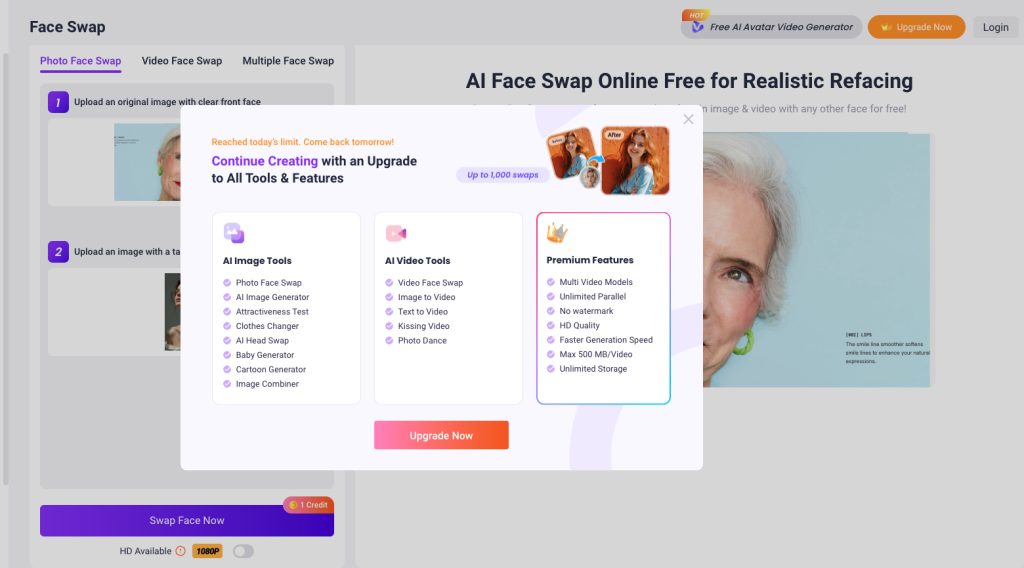
Testing Vidnoz: With Vidnoz, I had to register first, then figure out their credit system before even starting. After uploading both photos, I adjusted the blending settings to get the best match. The generation took about 8 seconds and used 5 credits from my free tier. The result had slightly finer detail, but honestly? It wasn’t strikingly better than Visro’s output.
💡 Winner: For quick fixes on family photos, Visro AI Multiple Swap Face wins hands down. The time saved and zero cost make it the obvious choice for casual use.
Scenario 2: Creating TikTok-Style Video
The Challenge: I wanted to swap my face into a 15-second movie clip to create viral-worthy content for social media.
Testing Visro AI: The process was ridiculously simple. I uploaded my 15-second clip along with a clear selfie, clicked generate, and waited about 1 minute and 30 seconds. The downloaded video came out watermark-free, and the result was good enough for TikTok—one click and done! Perfect for creators who value speed over perfection.
Testing Vidnoz: Vidnoz gave me more control over the process. After uploading the video, I could choose “expression recovery” and adjust the “mouth blend strength” for more natural movement. The whole process took about 2 minutes and cost 15 credits. The result? Noticeably better after the tweaks, especially around facial expressions and movement.
💡 Tip: Need to pump out quick social content? Go with Visro. Seeking perfection and have time to fine-tune? Vidnoz is your tool.
Need: Replace models across 50 product photos
Scenario 3: E-commerce Model Batch Shots
Need: Replace models across 50 product photos
The Challenge: A small online clothing store needs to replace models across 50 product photos to maintain brand consistency.
Testing Visro AI: Batch processing was surprisingly smooth. I uploaded all 50 product images at once, then uploaded 5 different faces I wanted to use. The entire generation process took about 15 minutes, cost nothing, and produced results that were more than good enough for small e-commerce sellers. The fact that it’s completely free makes it perfect for businesses on a tight budget.
Testing Vidnoz: Using Vidnoz Pro’s batch feature, I uploaded the images and selected 4K output for maximum quality. The processing took about 10 minutes—actually faster than Visro—but it cost $49.99 per month plus 150 credits. The quality difference was noticeable, though. The 4K resolution made the photos look incredibly professional, ideal for large brands that need top-tier visual content.
💡 Tip: Running a small business with limited budget? Visro is your lifesaver. Managing a big brand that needs high-resolution, professional results? Vidnoz Pro is worth every penny.
Scenario 4: Social Media Fun Content
The Challenge: I wanted to swap my friend’s face into a celebrity photo for laughs and share it across social media.
Testing Visro AI: This was almost too easy. Upload the photos, click generate, and within 1 minute I had a hilarious result ready to share. The best part? It cost nothing, and my friends genuinely couldn’t tell it was face-swapped. The speed made all the difference—I could create multiple versions and pick the funniest one.
Testing Vidnoz: Vidnoz required me to register and log in first, which added friction to what should be a fun, spontaneous activity. After uploading the images, generation took about 3 minutes and used 3 credits. The result worked well, but the extra steps and waiting time killed some of the spontaneous fun.
💡 Tip: For fun memes and quick laughs with friends, Visro AI all the way! The instant gratification factor is unbeatable.
Scenario 5: Professional Content Creation
The Challenge: Creating a YouTube video that requires 4K resolution and commercial usage rights for client work.
Testing Visro AI: Visro maxed out at 1080p resolution, which is perfectly fine for standard YouTube content. The tool includes free commercial usage rights with no extra features needed. For creators making regular 1080p YouTube videos, this is completely adequate and costs nothing. The simplicity means less time fiddling with settings and more time creating content.
Testing Vidnoz: Vidnoz’s paid version offered 4K resolution (3840×2160), which made a massive difference in professional projects. Beyond just resolution, the paid plan included commercial rights, AI voice integration, automatic subtitles, and API access for workflow automation. For high-end YouTube productions, brand campaigns, or client work requiring maximum quality, these features justified the subscription cost.
💡 Tip: If you’re a standard content creator making 1080p videos, Visro works perfectly fine. If output quality is absolutely critical and you need 4K with advanced features, invest in Vidnoz. It’s all about matching the tool to your actual needs.
Tech Breakdown (Skip if you’re not into tech)
Simple Comparison Table
| Feature | Visro AI | Vidnoz |
|---|---|---|
| Ease of use | ⭐⭐⭐⭐⭐ (foolproof) | ⭐⭐⭐ (learning curve) |
| Processing speed | ⭐⭐⭐⭐⭐ (fast) | ⭐⭐⭐ (medium) |
| Output quality | ⭐⭐⭐⭐ (enough) | ⭐⭐⭐⭐⭐ (professional) |
| Feature richness | ⭐⭐⭐ (face swap focus) | ⭐⭐⭐⭐⭐ (full suite) |
| Free usage | ⭐⭐⭐⭐⭐ (completely) | ⭐⭐⭐ (limited) |
| Ideal user | Casual users | Professional creators |
Final Word
Last week, I was chatting with Lisa about her recent photo editing needs. She asked, “I want to fix some family photos—Mom blinked in a few of them—but I don’t want to spend money on complicated tools. Any simple and effective options?”
I laughed and said, “You’ve got to try Visro. About 90% of users go with it. It’s completely free, super easy to use, and it only takes 5 seconds to swap faces. The output looks natural—you’d never guess it’s edited.”
Lisa’s eyes lit up. “Wow, that’s perfect for someone like me!”
I nodded and added, “Exactly. Visro is perfect for fixing family photos, creating funny memes, posting on social media, or making simple videos. Basically, anything quick and easy.”
Then she asked, “What about professional creators? Like YouTubers or ad campaigns?”
I said, “That’s when Vidnoz comes in. It supports 4K output, manual controls, commercial rights, and integrates with professional tools. It’s ideal for brand ads, bulk output, or enterprise-level projects.”
Lisa thought for a moment. “So could I combine both?”
I nodded immediately. “Absolutely. That’s the best strategy. Concept tests—use Visro AI (free). Drafts for clients—Visro AI again. Final deliverables—Vidnoz for 4K output. This way, you save cost, speed up iteration, and ensure high quality.”
Lisa’s face lit up. “Perfect! Now I don’t have to worry about wasting money and can get results quickly!”
 One Click New Face