

Feature | Remaker AI Faceswap | Visro AI Faceswap |
Face swapping results | ✅Good, but sometimes there are some unwanted things | ✅Better, especially good at matching expressions |
Processing speed | ❌Slower | ✅Very fast |
Price | ❌ Need Credits | ✅ 100% free to use |
HD output | ❌ Paid Feature | ✅ No limits |
Usage requirements | ❌ Need to Login | ✅ No Sign-up |
Free times | ❌ 1 time | ✅No limits |
Deep Insight: Remaker AI Face Swapping: Pros and Cons and Best Alternatives [2025-10]
Author: By Jason Zhang, October 11, 2025
Summary:Analyze the core features, advantages, and disadvantages of the Remaker AI face swap tool, and quickly discover a completely free, watermark-free, and login free online alternative.
When I searched for “face swap” on Google, I noticed that Remaker AI consistently ranks among the top three results. I also went through many review articles about Remaker AI and found that most of them were full of identical praise. Of course, such an excellent tool can’t be perfect — but it indeed leverages cutting-edge AI technology to enhance efficiency in both entertainment and creative work. In addition, Remaker AI offers a wide range of powerful tools, including image generation and editing features, as well as video creation tools.
In this article, we’ll focus on Remaker AI’s face swap feature and analyze it from three key perspectives — its core functions, advantages, and drawbacks — to help users make a more informed choice. Moreover, at the end of the article, we’ll reveal a perfect alternative to the Remaker AI face swap tool.
1.Introducing Remaker AI Main Feature: Face Swap
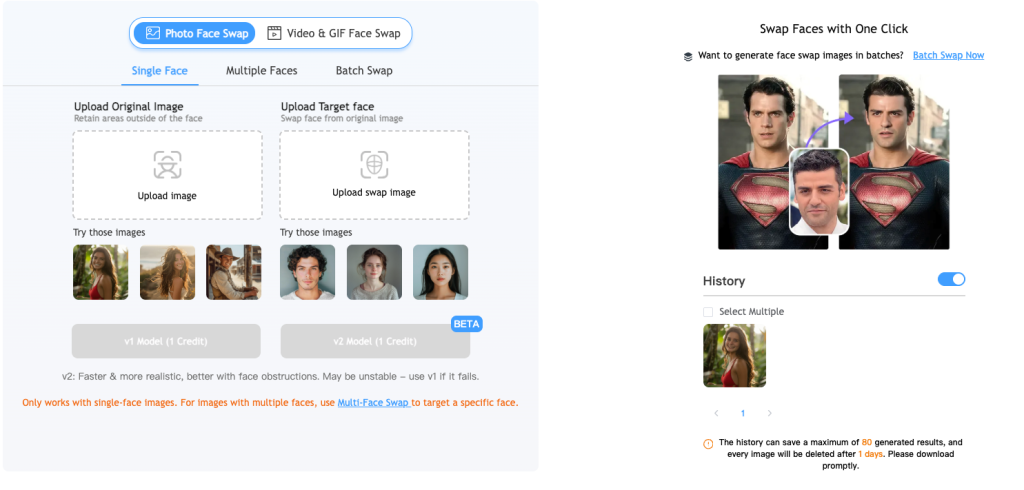
Photo Single Face Swap
Remaker AI single face swapping feature is incredibly fast and delivers excellent results. It’s primarily designed for one-to-one face swaps, meaning you only need to upload an original face and a target face, and has a wide range of applications.
Photo Multiple Faces Swap
Remaker AI Multi-Person Face Swapping is an upgrade to single-person face swapping, focusing on changing multiple faces in group photos. It can recognize each face in a group photo and independently select the faces to be replaced. It is commonly used to process group photos or family gathering photos, and adjust faces with poor expressions.
Photo Batch Face Swap
If uploading one photo at a time seems cumbersome, then batch face swapping is the best way to handle it. You only need to upload a batch of original face photos, and then upload a target face photo, and wait for automatic processing. It is common in the e-commerce field to batch process model photos, which does not require repeated operations and improves efficiency.
Video / GIF Single Face Swap
Remaker AI not only supports face swapping in images, but also supports face swapping in videos. It automatically recognizes the face in the video and replaces it with the face you want, with smooth and realistic results.
Video / GIF Multiple Face Swap
Furthermore, how do you swap faces of multiple people in a single video? Again, you only need to upload a video, and the AI will automatically recognize the faces of the multiple people in the video and split them into multiple faces. You can then select the face you want to swap. This system is highly controllable and has a wide range of applications.
Video / GIF Batch Face Swap
What if you have a lot of videos that need face swapping? Remaker AI also provides a very convenient way to batch upload videos, but this process is time-consuming. Officially, the maximum size cannot exceed 500MB, and each video cannot exceed 30 minutes. Due to the high server resource consumption, this feature is charged.
Summarize Remaker AI Faceswap Core Pros
Hight Quality Faceswap Results
Remaker AI’s face changing results are very realistic, with no visible flaws at all. It ranks among the top three current online face-changing applications.
Ease to Use and User-Friendly
Remaker AI is user-friendly and can be used on both mobile browsers and PCs, without the need to download software. It’s user-centric and eliminates unnecessary steps, allowing users to complete tasks with just a few clicks.
Price transparency
Remaker AI face-swapping service has clear pricing and offers suitable pricing for users with different budgets. It also supports a variety of payment methods, such as credit cards, Google Pay, and Apple Pay.
Fast Face Changing Processing
Remaker AI leverages advanced face-swapping algorithms and high-quality server resources to rapidly process even massive user concurrency and accurately output results. Tests have shown that it takes only 2 seconds to swap the face of a single person, and 2 minutes to output the result for a 5-minute video.
Summarize Remaker AI Faceswap Cons
After experiencing the face-changing function of Remaker AI, I found that the following problems may be encountered by users. Understanding these problems in advance can help you avoid obstacles reasonably.
Login Required
After using Face Swap once for free, you’ll be asked to log in. The free number of times you can use it is limited; it’s not completely free and unlimited.
Credit Limit
If you log in and want to continue using other features, you’ll be asked to purchase credits, which are slightly more expensive than other tools.
Face Swap Priority
If you’re a free user, face swaps aren’t prioritized; paid users’ tasks are prioritized.
Product Usage is Confusing
After initially accessing the product through Face Swap, if you navigate to other widgets and then want to return to Face Swap, it’s difficult to find the link. This is very confusing.
Misleading
The search results indicate it’s free, but when you actually use it, it’s not, which may cause user frustration.
Only One-Time Credit Purchases Are Shown
If you plan to subscribe to the service, I’m sorry, I searched for a long time but couldn’t find the link, and I don’t know if there’s a subscription link. This is very confusing.
Free Credits Don't Accumulate
If you claim free credits for several consecutive days, they won’t accumulate. A three-day accumulation would be better.
2.What is the price of Remaker AI?
Currently, judging by the official prices released by Remaker AI, there is only a one-time credit purchase available, and no subscription price has been found.

Remaker AI offers various pricing plans, all based on a one-time credit payment. Each price corresponds to a different number of credits. Credits are used for paid features, such as batch face swapping and video face swapping. 200 credits cost $5.99, primarily for users to try out the features. 530 credits cost $9.99. 1100 credits cost $19.99, 3000 credits cost $49.99, and 20,000 credits cost $299.
As shown in the table below:
530 Credits
200 Credits
1100 Credits
3000 Credits
20000 Credits
$9.99
$5.99
$19.99
$49.99
$299
Supported payment methods: bank card payment, Google Pay, Apple Pay. If you need more payment methods, just click to apply.
How does Remaker AI Face Swapping Consume Credits?
We only review the credit calculation for the face-swapping feature in Remaker:
- Photo Face Swapping: A single-person face swap costs 1 credit, while a multi-person face swap costs 4 credits. Batch face swaps are calculated based on the uploaded file.
- Video or GIF Face Swapping: A single-person face swap costs 1 credit per second, with a maximum video size of 500MB and a maximum length of 30 minutes. A multi-person face swap costs 2 credits per second. Batch face swaps cost 1 credit per second.
3.Why Choose to Use AI Face Changing Tools?
With the development of technology, AI has changed many ways of entertaining people. Among them, AI face swapping has completely transformed the way we live and work. Compared with traditional image editing methods, AI face-swapping demonstrates unparalleled convenience and accuracy. Why do we need to choose AI face-swapping tools? The following reasons make it so popular:
No professional skills required
Even if you don’t know any image editing software, you can quickly process one or multiple images in seconds. Traditional facial editing tools require both time and experience to learn and master. AI face-swapping tools lower the learning curve and cost, allowing anyone to create professional-looking images like a pro and create engaging and personal creations.
Accurate face-swapping results
With advances in AI technology, algorithms can accurately recognize faces in both images and videos, enabling face swaps. However, compared to traditional editing methods, the probability of blemishes is significantly higher.
Efficient Processing Performance
AI algorithms significantly optimize the image recognition and fusion processes, significantly increasing the speed of face swapping. What once required hours of manual retouching can now be completed automatically in minutes, significantly improving efficiency.
Meeting Creators' Needs and Streamlining Creative Process
AI face-swapping tools effectively alleviate the time-consuming pain points of content creation. Whether creating short entertainment videos, viral social media content, or personalized ads, they significantly improve production efficiency, allowing creators to focus more on their creativity.
Furthermore, online face-swapping tools are easy to use, requiring no expensive software or professional training, making them accessible to everyday users and allowing them to experience the joy of creation.
Combining Entertainment and Marketing Value
AI face-swapping tools are not only fun to use but also offer significant professional benefits. Marketers can use them to create more engaging advertising content, while social media creators can easily create highly engaging posts. Whether used for memes, event promotions, or creative short videos, AI face-swapping can help you connect with your audience on a deeper level.
Affordable Creative Options
Compared to expensive traditional editing software, AI face-swapping tools offer a cost-effective alternative. Many platforms offer free trials or flexible and affordable paid plans, allowing more people to enjoy high-quality creative experiences at a lower cost. Transparent pricing structures also ensure users can use them with confidence, without worrying about additional costs.
4.Who Is Remaker AI Face Swapping Suitable for?
Content Creators & Social Media Influencers
- Quickly create engaging and creative images or videos.
- Swap your face with movie characters, celebrities, or influencers to boost fan interaction and content appeal.
Marketers & Brand Promotion Teams
- Ideal for advertising, social media campaigns, or short video promotions.
- Generate high-quality visual content that grabs attention and enhances marketing impact.
Video Makers & Film Enthusiasts
- Perfect for short film creators or hobbyist video editors.
- Replace characters’ faces in video footage to add fun, creativity, or unique visual effects.
Educational & Experimental Use
- Suitable for learners in AI or visual content courses to practice face swapping techniques.
- Useful for researchers interested in AI image processing experiments and testing.
Entertainment & Personal Use
- Casual users who want to experience AI face swapping for fun.
- Create amusing memes, funny videos, or share creative content with friends.
5.What Do You Use Remaker AI Face Swapping for?
Remaker AI FaceSwap can be used for entertainment creation, social media content production, marketing advertising, personalized gifts, educational experiments, and video and film creation. Whether creating comedic shorts, creative videos, brand promotional materials, or exploring AI face-swapping technology, Remaker AI helps users easily generate high-quality, natural-looking face-swapping works, improving creative efficiency and fun.
Entertainment and Fun Creation
Remaker AI FaceSwap makes creating entertainment easy and fun. Users can create funny videos or memes by swapping their own or a friend’s face onto a film, TV, celebrity, or game character, creating unique, humorous content that brings joy.
Social Media Content Creation
Content creators can use Remaker AI to create compelling posts and short videos, quickly boosting social media engagement and visibility. Through innovative face-swapping effects, users can create engaging and creative content, enhancing fan engagement.
Marketing and Advertising
Brands and marketers can use Remaker AI to quickly generate advertising creatives or promotional videos. With high-quality visual output, this tool captures the attention of target audiences and helps marketing campaigns convey their messages more vividly and effectively.
Personalized Gifts and Souvenirs
Remaker AI is also perfect for creating personalized gifts or souvenirs. Users can customize fun photos and short videos for friends and family, using face-swapping technology for special occasions to create unique gifts and commemorative videos, making surprises even more creative.
Educational and Experimental Uses
Remaker AI provides an ideal platform for those learning and researching AI technology. It helps users explore the principles of AI face-swapping technology, conduct visual creation and image processing experiments, and deepen their understanding of AI in image generation.
Video Production and Film Creation
In video and film production, Remaker AI can be used to replace character faces and enhance creative expression. Whether it’s a short film, micro-film, or animation, users can leverage face-swapping effects to enhance visual interest and storytelling, adding a unique charm to their work.
6.How to Use Remaker AI FaceSwap?
Step 1: Open Remaker AI FaceSwap
First, visit the Remaker AI website or open the FaceSwap tool to prepare for face swapping.
Step 2: Upload your source and target images
Select the source image you want to swap and the target face image you want to replace it with. Once uploaded, click the “Swap Now” button to begin processing.
Step 3: AI-Powered Analysis and Processing
Remaker AI automatically analyzes the two images to ensure a perfect match in lighting, facial expressions, and skin tone, resulting in a natural, seamless face swap.
Step 4: Generate, Download, and Share
Once the processing is complete, your face-swapped image or video will be generated in minutes. You can download the file directly or share it with friends and social media platforms.
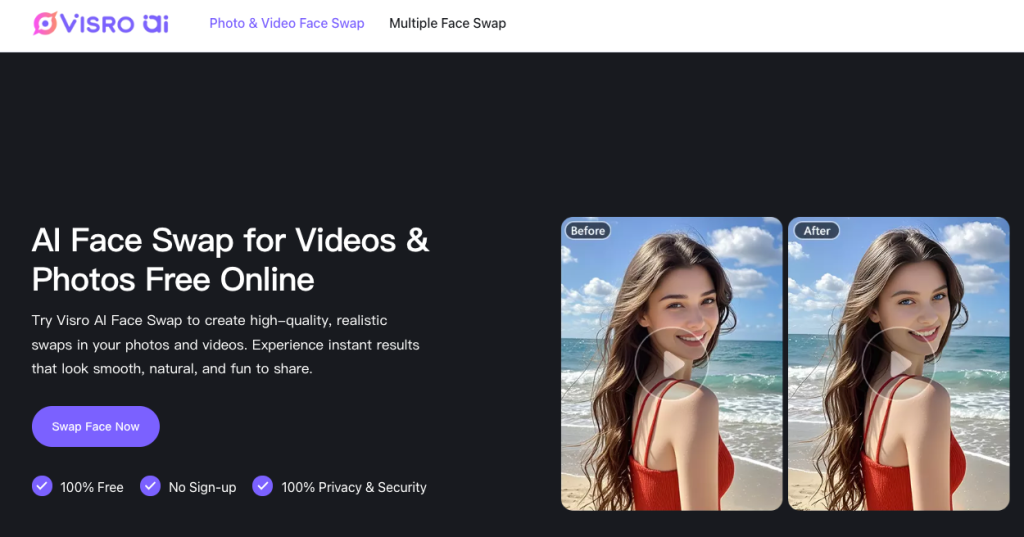
7.Best Alternatives to Remaker AI: Visro AI
After testing the top ten online face changing tools, I found that the best alternative to Remaker AI face swapping is Visro AI. I will compare them in a table to help you quickly understand why I am so sure.
8.Real User Reviews of Remaker AI Face Swapping
Real user reviews and experiences can enhance the credibility of face-swapping tools. Below are real user reviews of Visro AI and Remaker AI. We’ve also compared them using real-world examples to help you make a more informed choice.
User Testimonials
- Content Creator – Jhon
“As a content creator, I’ve tried several AI face-swapping tools, including Remaker AI, but they always felt like they had an ‘AI-like’ effect on the details. I was pleasantly surprised by Visro AI’s performance – the face swaps were smooth and natural, with more accurate skin tone and lighting matching, and virtually no errors in complex scenes. Most importantly, its user interface is highly intuitive, allowing me to focus on my creativity rather than on retouching. For creators striving for high-quality visual content, Visro AI is truly a smarter choice.”
- Marketing Professional – Tom
“For marketing projects, I need to quickly generate high-quality assets. While Remaker AI is comprehensive, it occasionally produces unnatural blending when swapping multiple images or for advertising-level face swaps. Visro AI excels in this area – it processes faster, matches faces accurately, and generates images that require virtually no retouching. It truly allows me to efficiently produce professional-quality visual content, saving me significant design costs and time.”
- Free User – Jack
“I tried both Visro AI and Remaker AI as a free user. Remaker AI… The free version of Visro AI has limited features, and the output images often have watermarks, which detract from the quality of the finished product. Visro AI is completely different – it has a user-friendly interface, generates images quickly, and produces realistic and natural results, and most importantly, there are no annoying watermarks. For beginners or those on a budget, Visro AI is definitely more recommended.”
Case Studies
- Case Study 1: Visro AI and Remaker AI – Face Swap Quality Comparison
We tested both tools on single-person portraits and group photos.
In single-person portraits, Visro AI’s face swap results were more natural, with clear facial details, precise lighting, and virtually no artifacts. In comparison, while Remaker AI was able to accomplish basic face swapping, it exhibited some harshness in skin tone transitions and expression coordination, especially in complex lighting conditions.
When applied to multi-person scenes, Visro AI’s algorithm automatically recognized and optimized each face, achieving natural fusion of multiple faces. Remaker AI, on the other hand, struggled with complex backgrounds, resulting in partial misalignment of faces or unnatural fusion of edges.
👉 Conclusion: Visro AI performed more consistently in terms of face recognition and fusion accuracy, producing more realistic and consistent images.
- Case Study 2: Social Media Creation Efficiency – Visro AI Accelerates Creative Delivery
A social media creator used both Visro AI and Remaker AI to create content for her video channel.
For a project, she needed to swap her face with a film or television character for a promotional video. Visro AI’s generation speed was incredibly fast, with upload and output taking only seconds, while accurately preserving facial expressions and lighting. In comparison, Remaker AI took longer to process and exhibited slightly rougher skin tones and detail.
For creators who need to produce content frequently, Visro AI not only saves significant time but also maintains visual consistency, making the creative process smoother and more efficient.
👉 Conclusion: For a balanced experience of speed and accuracy, Visro AI is the top choice for social media creators.
- Case Study 3: Advertising and Video Applications – Visro AI Creates a Professional-Grade Visual Experience
A creative marketing company used both tools to test face-swapping in videos for the production of advertising videos. Visro AI’s video processing is incredibly smooth, accurately tracking dynamic facial expressions and maintaining natural emotional and movement coherence. While Remaker AI can successfully perform face swapping in videos, it can produce blurry or stiff expressions in high-speed motion footage, impacting the overall viewing experience.
Utilizing its proprietary dynamic face tracking and light matching technology, Visro AI’s output videos are more natural, realistic, and possess a cinematic quality, perfectly suited for brand-level advertising projects.
👉 Conclusion: Visro AI excels in video face swapping and is an ideal choice for companies seeking high-quality visual content.
9.Practical Tips for Getting The Best Face Swap Results
- Use High-Quality Photos: Clear, high-resolution images help the AI recognize facial details more accurately, resulting in sharper and more realistic swaps.
- Match the Lighting: Choose photos with similar lighting direction and brightness. If one image has soft natural light, make sure the other does too — consistent lighting ensures seamless blending.
- Face the Camera: Front-facing or slightly angled photos work best. Extreme angles can distort features and reduce realism.
- Match Facial Expressions: If the source image is smiling, select a target photo with a similar expression. Matching emotions helps the AI create natural, lifelike results.
- Focus on the Face: Crop and clean up your photos before uploading. Removing distractions helps the AI focus on key facial features for a cleaner output.
- Experiment with Settings:Don’t be afraid to tweak things! Adjust options like skin tone blending or face alignment to find the configuration that produces the best results.
- Avoid Low-Quality Inputs: Blurry or pixelated faces make it difficult for AI to process details, often leading to poor results. Always use clear, well-defined images.
- Test Multiple Times: Each swap attempt can yield new insights. Try different lighting, angles, or settings to discover what works best for your photos.
- Refine with Post-Editing: After swapping, enhance your image using a simple photo editor. Adjust brightness, contrast, or shadows to achieve a perfectly natural finish.
- Try Different Tools:Each AI face swap tool has its own strengths. Experiment with several top-rated online generators to find the one that best fits your style and goals.
10.Summarize
Overall, Visro AI offers powerful AI face swap capabilities, making it an ideal choice for both individual users and professional creators. Its intuitive interface, easy operation, and rich customization options make it perfect for content creators, marketers, or anyone looking to create high-quality face swap content effortlessly.
In comparison, Remaker AI can handle basic face swap tasks, but falls short in processing speed, facial detail accuracy, and handling multiple faces in a single image. Free users may also encounter watermarks or limited features, resulting in a less seamless experience than Visro AI.
Whether for social media content, marketing campaigns, or personal entertainment, Visro AI face swap tool provides a comprehensive platform that delivers natural, professional-quality results efficiently. For those seeking faster generation and finer face swap precision, Visro AI is clearly the superior choice.